Route Planner - GetWay
- 3.8
- Rating
- 100.00K
- Installs
- Free
- Price
 Analysis by App-foxy
Route Planner - GetWay is the kind of navigation app I would try when my main concern is building a practical route rather than simply following turn-by-turn directions. After spending time with it, my impression is fairly clear: it is a focused travel-planning tool from Logi Way, useful for people who want to think through a journey before setting off, but less convincing as a complete replacement for a mature everyday navigation service.
The app is free to install and sits in the Maps & Navigation category. It is suitable for Everyone, works on Android devices running version 5.0 or later, and has reached over 100 thousand installs. Those details make it easy to test without much commitment. The important question is not whether it can be downloaded easily, but whether its route-first approach fits the way you actually travel.
What using GetWay feels like in everyday travel
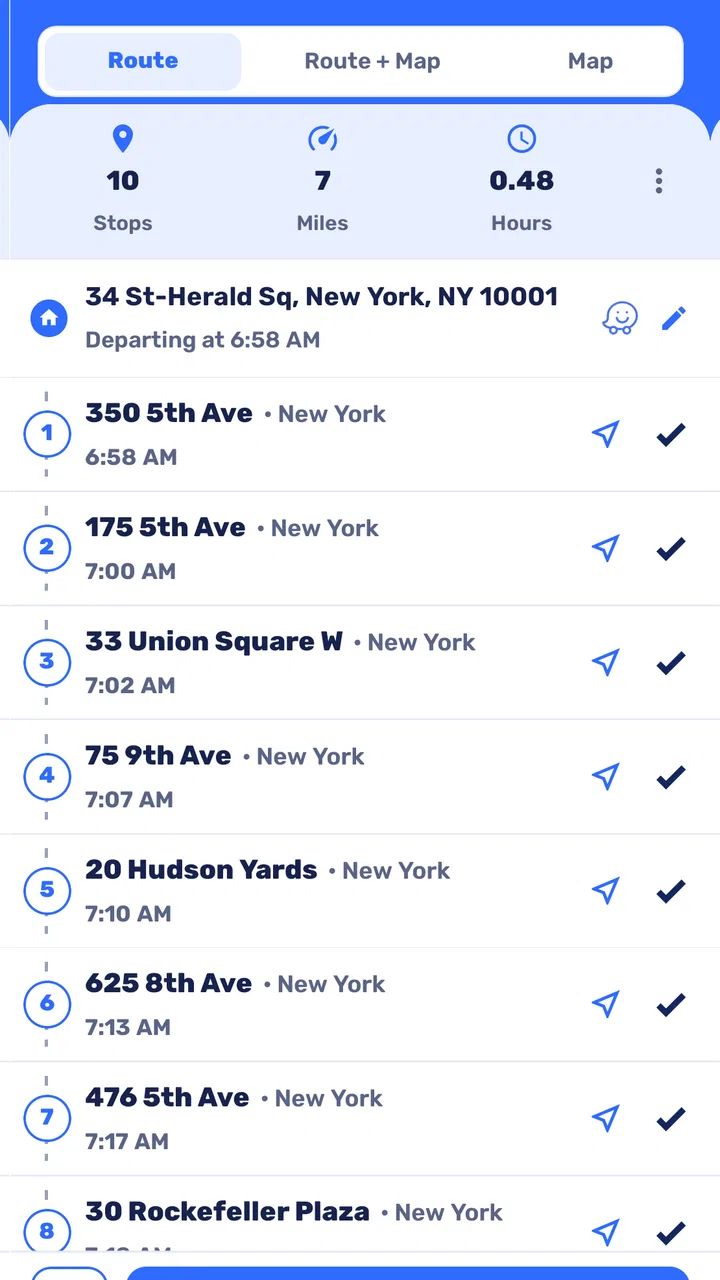
The central idea is straightforward: use the app to plan a journey with an emphasis on keeping the route efficient and avoiding unnecessary travel. That sounds simple, but it changes how I approach navigation. Instead of opening a map only after I am already on the road, I can use a planner to consider the trip as a whole, check the proposed path, and decide whether it makes sense before leaving.
You May Also Like

 Blood Strike: 2.5 Anniversary
Blood Strike’s Loadouts Turn Every Drop Into a Tactical Gamble
A close look at Blood Strike’s custom loadouts: how fast access to signature weapons reshapes its battle royale rhythm, rewards preparation, and narrows the gap between fights.

 Pandora - Music & Podcasts
Pandora’s Music Is Easy to Start, but Harder to Recover
Pandora’s strength is its low-effort path from a seed to a station. Its weak spot is how much confidence it asks you to place in connection, setup, and quiet recovery.

 8 Ball Pool
 Is Built on Rivalries, Rematches, and Routine
A close look at the rivalries, rematches, shared routines, and unanswered safety questions that turn a quick pool match into a persistent mobile community.

 Samsung Music
’s Quiet Strength Is Playing What You Already Own
Its reach comes less from spectacle than from dependable access to a personal library. That simplicity is both the app’s strongest retention engine and its ceiling.

 AccuWeather: Weather Radar
AccuWeather Review: A Quick, Clear Forecast for Everyday Decisions
For everyday plans, the best forecast is the one you can understand quickly. AccuWeather makes rain timing, radar, and local conditions easy to act on, with a few trade-offs.

 Hill Climb Racing
Why Hill Climb Racing Still Turns Crashes Into One More Run
A tiny car, a bumpy hill and one more upgrade: Hill Climb Racing keeps resurfacing because its simple chaos makes every near-miss feel personal.
More From Our News Desk



That distinction matters for journeys with several stops. A normal map app is often excellent when I already know the destination and need live guidance. A route planner is more useful when I am still working out the order of places, trying to reduce backtracking, or preparing a trip where a little planning can save time and fuel. GetWay makes the most sense in that earlier stage.
I would use it for a Saturday with several errands, a delivery-style route, or a day of sightseeing where the order of stops affects the entire experience. For example, if I need to collect something from one part of town, visit a shop across town, and finish near a railway station, I would rather examine the route before starting than improvise each leg separately. The benefit is not dramatic on every journey, but it becomes more noticeable when the stops are spread out.
The strongest reason to try GetWay is that it encourages deliberate route planning instead of reactive navigation. That is a meaningful strength for anyone who regularly makes multi-stop trips. It can help turn a vague list of destinations into a journey that feels more organized, even when the final route still needs a quick check in another navigation tool.
Where the route-planning focus helps most
My favorite use case is preparation. Before leaving home, I can think about the route with a calmer mind than I would have while sitting in traffic. That makes it easier to notice an awkward detour, decide whether a stop is worth keeping, and estimate how much of the trip is spent moving between places rather than actually doing what I planned.
This is particularly useful for people who work across multiple locations. A tradesperson, courier, property manager, or sales representative may not need a complicated fleet platform for every day, but may still benefit from a dedicated place to organize a sequence of destinations. GetWay is also a reasonable fit for families arranging a busy day, especially when the route needs to balance convenience with a fixed final destination.
It can also be helpful for travelers who prefer to prepare before leaving an unfamiliar area. A route planner gives me a chance to look at the shape of the journey rather than blindly accepting the first option presented by a general map service. That preparation can reduce the mental load of deciding what comes next once the day is underway.
There is a subtle trade-off here. Planning a shorter route is not automatically the same as planning a better route. A slightly longer road may be easier to drive, more comfortable at a busy time, or better suited to a vehicle with particular needs. I would treat the suggested route as a starting point and inspect it with common sense, especially before a long trip or when road conditions may change.
A practical workflow I would recommend
I found the app more useful when I treated it as a planning desk rather than a magic button. First, I would gather the destinations in a simple list. Then I would enter them carefully, check the resulting sequence, and look for obvious backtracking. After that, I would compare the suggested order with the real purpose of the trip. If one stop has a strict opening time or another must happen last, the theoretically shortest order may not be the right one.
That workflow reveals one of the app’s less obvious strengths: it encourages me to separate route efficiency from schedule efficiency. A route can look compact while still being inconvenient if it places an important stop at the wrong point in the day. I would therefore use GetWay to reduce unnecessary movement, then apply practical judgment about appointments, parking, loading, breaks, and return travel.
Another useful habit is to review the route before starting the engine, not during the trip. This sounds obvious, but it is easy to underestimate how much confusion comes from changing destinations while already traveling. Preparing the sequence in advance makes the app more valuable and keeps the driver’s attention where it belongs.
For a recurring journey, I would also keep a personal note of what worked. If the route repeatedly sends me through an awkward area or creates a poor order for my schedule, that is a sign to adjust my stops manually rather than assuming the shortest-looking result is ideal. The app can support the decision, but it should not replace local knowledge.
How it compares with ordinary map applications
Compared with a familiar all-purpose map application, GetWay feels narrower and more intentional. General map services usually combine route guidance with places, traffic information, business details, street imagery, transit tools, and other surrounding services. Their advantage is breadth. I can often search for a destination, read practical information, and begin navigation from the same place.
GetWay’s appeal is different. A dedicated route planner can make the planning task feel less buried beneath unrelated map features. If my goal is to arrange a journey efficiently, that focus may be more comfortable than working inside a large application designed to do everything. It is a bit like using a clean checklist instead of a crowded dashboard.
However, I would not choose it over a full navigation suite when live driving assistance is the priority. Someone who depends on changing traffic conditions, detailed place information, transit connections, or extensive location discovery may be happier with an established map platform. GetWay is better viewed as a companion for organizing travel, not automatically as the only navigation app a person needs.
The comparison also depends on how often you plan multi-stop routes. If nearly every journey is from home to one familiar destination, the extra planning focus may not add much. In that situation, a standard map app is faster because it gets to the single destination with fewer decisions. GetWay earns its place when the route itself is the problem to solve.
The main weakness: planning still requires careful judgment
The most important limitation is that route optimization can create a false sense of certainty. A route may be mathematically tidy but practically inconvenient. Without checking the context around each stop, I could end up with an order that saves distance while making the day harder because of parking, timing, loading, walking, or a destination that is difficult to access.
This is not a flaw unique to GetWay, but it matters more in a focused planner because the promise of efficiency is central to the experience. I would not enter a long list of stops, accept the first arrangement, and assume the work is finished. The app is most effective when I use it to expose options and then make the final decision myself.
There can also be friction when a journey changes unexpectedly. A missed appointment, a closed location, or a last-minute request can turn a carefully prepared sequence into an outdated plan. In those moments, a broader navigation service may feel more flexible because it is designed around immediate rerouting and live travel decisions. GetWay is strongest before the journey, while the situation is still stable.
Another consideration is the app’s commercial model. Although the app is free, in-app purchases are listed from $13.99 to $369.99 per item. That is a very wide range, so I would pay attention to what any optional purchase provides before confirming it. A free starting point is welcome, but users who want to explore paid capabilities should approach the purchase screen carefully and decide whether those additions match their actual travel habits.
The current version is 1.1.30, and the app has an average rating of 3.8 from around 386 ratings, alongside 39 written reviews. I read that overall score as a sign of a useful but not universally satisfying tool. It is not a reason to dismiss the app, but it does support my view that expectations should be realistic: GetWay may solve a particular planning problem well without becoming everyone’s preferred navigation application.
Who should use it, and who should skip it
I would recommend GetWay to people who regularly organize several destinations into one trip. It is a natural candidate for independent workers, busy households, travelers arranging sightseeing days, and anyone who dislikes discovering route problems halfway through an outing. It may also suit users who prefer a dedicated planning experience instead of a large map application filled with extra services.
The app is especially appealing if you enjoy preparing a route in advance and are willing to review the result critically. That second part is important. The best users will not simply ask the app to decide everything; they will use its route suggestion as a practical draft, then adjust their plans around real-world constraints.
I would be more cautious about recommending it to someone who wants one universal navigation solution. If you need a rich place-search experience, frequent live changes, or a familiar turn-by-turn system for every drive, a broader alternative may be more convenient. I would also skip it if nearly all of your travel involves one destination at a time, because the planning advantage may not justify adding another app to your routine.
For new users, my advice is to begin with a small, low-pressure trip rather than a complicated holiday itinerary. Try a few nearby stops, inspect the order, and see whether the planning style feels natural. This quickly shows whether the app helps you think more clearly or simply adds another step before using your usual navigation tool.
Details worth considering before installing
GetWay is developed by Logi Way and was released on March 22, 2020. Its Everyone content rating makes it broadly accessible, while support for Android 5.0 or later means it can run on many older compatible devices as well as newer phones. Those practical details make it a low-risk experiment for people curious about a route-focused tool.
I would still prepare for a two-app workflow in some situations. Use GetWay to shape the journey, then open your preferred navigation service when you need the final driving guidance or additional local context. That is not a failure of the app; it is a sensible division of responsibilities. A planner and a live navigation service do not have to compete if each is used for what it does best.
One tip I found valuable is to plan around the purpose of each stop, not only its address. If one visit involves carrying bulky items, place it where the route and parking situation make sense rather than allowing distance alone to dictate the order. Another is to leave room for the human parts of travel: breaks, delays, loading time, and the possibility that a quick stop will take longer than expected. A short route is useful only when it remains manageable.
I would also avoid treating a route as permanent. Recheck it when the day changes, and be prepared to remove a stop if the schedule becomes unrealistic. The app can make a complicated plan clearer, but it cannot make an overfilled day comfortable. That is the kind of limitation worth understanding before relying on any route-planning application.
My final view of Route Planner - GetWay
After using it as a planning tool, I see GetWay as a focused and potentially useful addition to an Android travel toolkit. Its best quality is not that it replaces every map service; it is that it gives multi-stop travel a clearer starting point. When I have several places to visit, that focus can save mental effort and reveal a more sensible route than handling each destination separately.
Its weaknesses are equally clear. The route still needs human review, changing plans may be easier in a broader navigation app, and the optional purchase range deserves attention before spending money. Users looking for a complete location platform may find it too specialized, while people with simple one-destination journeys may not notice enough benefit.
My recommendation is therefore specific: try GetWay if route organization is a recurring problem in your life, especially for errands, work visits, or planned days with several stops. Keep another navigation option available for live guidance and unexpected changes. Used in that role, GetWay is a practical route-planning companion rather than an all-purpose map replacement, and that honest expectation is where it delivers the most value.
FAQs for Route Planner - GetWay
01What is Route Planner - GetWay, and what can I use it for?
Route Planner - GetWay is designed to help users organize journeys by creating routes between multiple destinations. It can be useful for everyday errands, road trips, deliveries, sightseeing, or planning a sequence of stops more efficiently. Before downloading, keep in mind that the exact tools available may depend on your device, app version, map coverage, and whether the route requires an active internet connection.
02Does Route Planner - GetWay provide turn-by-turn navigation?
Route Planner - GetWay primarily focuses on planning and organizing routes, so users should check the app’s current feature list to confirm whether it includes full turn-by-turn voice navigation or mainly prepares routes for use with another navigation service. In practice, route-planning apps can differ in how they handle live directions, traffic updates, rerouting, and spoken guidance, especially between Android and iOS versions.
03Can I plan a route with several stops in Route Planner - GetWay?
Multi-stop planning is one of the main reasons people choose a route-planning application, and GetWay is intended to help arrange journeys involving more than one destination. However, the number of stops, route optimization options, and the ability to reorder locations may vary according to the app version or subscription model. Review the available limits before relying on it for a large delivery or travel itinerary.
04Does Route Planner - GetWay work offline?
You should not assume that every function in Route Planner - GetWay works without an internet connection. Creating routes, searching for addresses, loading map data, checking traffic, and recalculating a journey may require mobile data or Wi-Fi. If you plan to travel through areas with weak coverage, test the app beforehand and look for options to save routes, download map information, or export directions for offline use.
05Is Route Planner - GetWay free to download and use?
The app may be available to download at no initial cost, but free access does not always mean that every feature is included. Some route-planning applications offer optional purchases, subscriptions, advertising, or limits on the number of destinations and saved routes. Check the Google Play Store or Apple App Store listing for the latest pricing, in-app purchase details, supported devices, and any differences between Android and iOS.
Pros
- Plans routes with multiple stops in a single trip.
- Clear turn-by-turn guidance helps simplify unfamiliar journeys.
- Useful for comparing different route options before departure.
- Can help organize errands
- deliveries
- or sightseeing efficiently.
- Simple interface makes basic route planning quick to understand.
Cons
- Accuracy depends on current map data and GPS availability.
- Advanced planning features may require a subscription or in-app purchase.
- Multiple-stop routes can be less reliable in heavy traffic.
- Battery usage may increase during long navigation sessions.
- Some features may vary depending on your country or region.

Route Planner - GetWay
Gallery